
Let’s get your school started together.
If you’re considering MobileKids for your nursery, preschool or school, write to us. Tell us about your school and what you need; we’ll explain how to get started and how the 14-day trial works.
- Free for parents and teachers
- 14-day trial for schools
- No form, just email
Our email address
helloFor questions about your school, the trial and subscriptions. The button opens your email app with a ready-made template for your school’s details.
Send an EmailHere’s what to include when you write
A short email is enough. If we know your school, we can explain more clearly which modules will help you and in what order the setup will go.
There’s no form on this site. What you write comes straight to us from your email app and is used only to reply to you. Details are in the Website Privacy Notice.
Put these in your email
Your school’s name
A nursery, preschool, school, or a school that houses more than one level.
City
The city your school is in; the country too, if you’re outside Turkey.
Number of branches
Are you in a single building, or do you have several branches?
Number of classes and children
Approximate numbers are fine; better if you write them per branch.
Modules that matter to you
Just tell us which ones are the priority.
How getting started works
Five steps from the email to the first class. The setup steps wait for you on the school’s home screen, too.
Write to us
Tell us about your school and what you need; we’ll answer your questions and plan the start together.
Sign up with your phone
The school owner signs up with a phone number and an SMS code. MobileKids is coming soon to the App Store and Google Play.
Create and verify your school
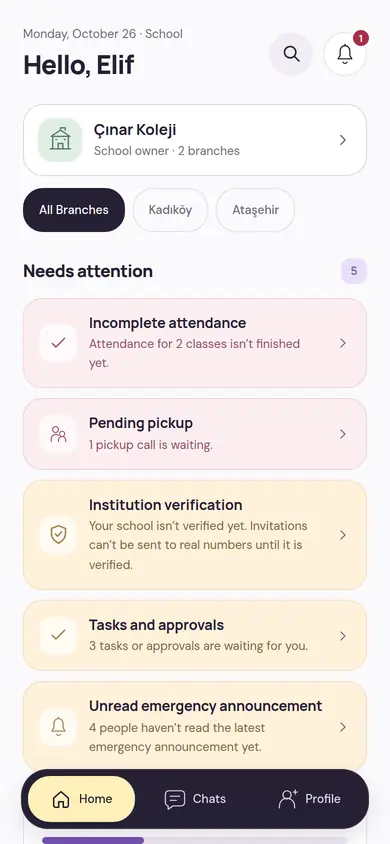
The person who first creates the school becomes its owner. You add your documents and the platform team reviews them; until the school is verified, invitations can’t be sent to real numbers.
Set up your team and classes
You open the branches and classes and invite teachers by phone number. You add the students and invite each child’s parents.
The trial starts with the first real step
The 14-day trial starts not on the day you open the account, but when the first teacher joins the school or the first student is added.
All features are on during the trial. When the trial ends, nothing is deleted; records stay readable.
If you’re a parent or teacher, you join through your school’s invitation
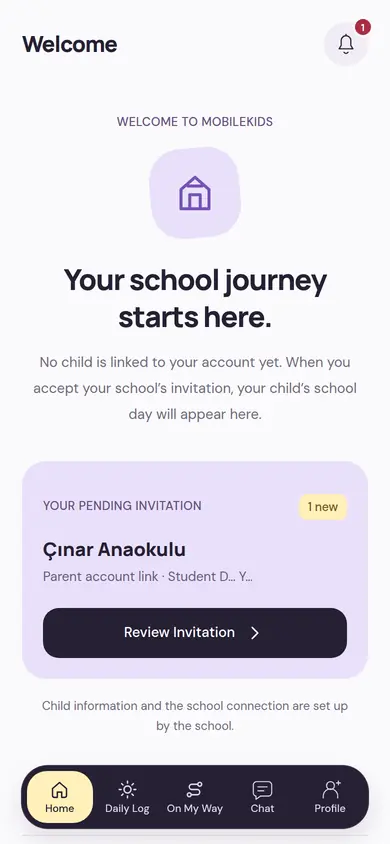
Parent and teacher accounts are opened through the school; they’re free, and you don’t need to write to us separately. Your school invites you with your phone number.
If you’re a parent
The school sends an invitation to your number for your child. You sign up in the app with your number; the invitation is waiting on your home screen.
If you’re a teacher
The school sends a 7-day invitation to your number. When you accept, the school assigns you to your classes.
If your school doesn’t use MobileKids yet, you can show them this site or suggest they write to us.
Before you write
The most common questions about getting in touch. Other questions and answers are on the Frequently Asked Questions page.
Can I reach you by phone?
For now you can reach us by email only. Writing about your school and your question makes it easier for us to get back to you with the right information.
We have several branches; should each branch write separately?
No, a single email is enough. Write the number of branches and the approximate number of classes and children in each. All branches are set up under the same school.
I’m a parent, who should I write to about my account?
Your child’s records and your invitation are with your school; ask your school first. You can also write to us about a problem with the app itself.
What is the information I write used for?
Only to reply to you and to carry out your request. Details are on the Website Privacy Notice page.
If you’d like to read first
The pricing model, how data is protected and the frequently asked questions; they may help before you talk to your school.
Pricing
Free for parents and teachers, a single plan for the school: monthly, 6-month or yearly. 14-day free trial.
PricingSecurity and Privacy
No ads, analytics or face recognition; photos open by permission, and critical actions leave a record.
Security and PrivacyFrequently Asked Questions
Short answers about joining, roles, the trial, the subscription and data.
All QuestionsWhen you’re ready, one email is enough
Write your school’s name, your city, and the number of branches, classes and children; we’ll plan the rest together.