
Free for parents and teachers, one plan for the school.
Only the school pays for MobileKids. There is a single feature plan with all modules included; you choose monthly, 6-month or yearly. A school first tries it free for 14 days.
- Free for parents and teachers
- One plan, all modules
- 14-day free trial
Who pays?
Parents and teachers use the app the most, but they don’t pay for it. The subscription belongs to the school.
Parent
Free
Joins through the school’s invitation; follows their child’s day at school from the phone.
- The child’s day, announcements and messages
- Pickup, On My Way and authorized people
- Forms, permissions and payment reports
Teacher
Free
Joins through the school’s invitation; with their own account and their own number.
- Attendance, Daily Log and End of Day
- Photo sharing and the pickup queue
- Work hours, leave, shift and expense requests
School
One planMonthly, 6-month or yearly; 14-day trial first
The price shows in the store, in the country’s currency.
- All modules, all branches and classes
- No limit on students, teachers or classes with a subscription
- Desktop management approved with your phone included
One plan, three lengths
There is no basic or advanced plan. Every school uses the same plan; the only thing you choose is how long it runs.
Monthly
The plan runs for one month. For schools that want to go month by month.
6-Month
The plan runs for six months; roughly one school term.
Yearly
The plan runs for one year; a whole school year.
- The plan and modules are the same in all three options; only the length changes.
- All modules are included in the plan; there is no separate charge per module.
- A school turns off a module it doesn’t use. A turned-off module disappears from the screens; its data is not deleted.
- The health and medication modules open once the country’s legal policy is verified.
What’s in the plan
The price is in the store, in your own currency
MobileKids is coming soon to the App Store and Google Play. The price will show in the store in the currency of your country; in Turkey, TL. Until in-store purchase opens, the app doesn’t take payment; a subscription starts with a request sent from the app.
Choose the plan length
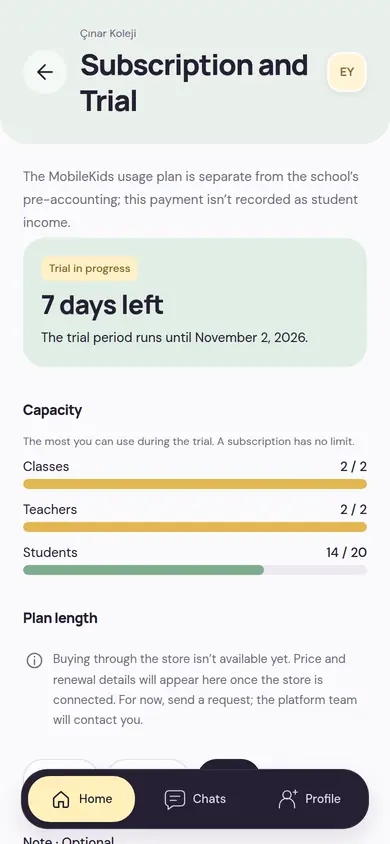
The school owner opens the Subscription and Trial screen in the app and picks monthly, 6-month or yearly.
Send a plan request
You can add a short note: the number of students or branches, the date you want to start. The school has one open request; it can be updated or withdrawn.
The team gets in touch
The MobileKids team sees your request and contacts you. The app never asks for a card or payment details.
14-day free trial
The trial doesn’t count the days you spend setting up your school. It starts when the first real work happens at the school and runs for 14 days with all features on.
-
SetupTrial hasn’t started
Get your school ready
You create your school, send your documents for verification, and open the branches and classes. A verified school can send invitations to real numbers. The trial clock doesn’t run until the first teacher or student arrives.
-
Day 1Trial starts
The first teacher or the first student
The 14 days start when the first teacher joins the school or the first student is added. The days left show on the Subscription and Trial screen.
-
14 daysAll features on
Try it with a real class
Attendance, Daily Log, pickup, messaging, finance: all of it is on. You invite your parents and teachers and live your school’s real day in the app.
-
AfterSubscription
Pick up where you left off
When the subscription starts, the capacity limit is lifted and new work opens up. Everything you entered during the trial stays in place.
Trial capacity
20students
2teachers
2classes
- The capacity applies before the trial starts, too.
- Pending teacher invitations count toward the teacher total.
- Each school tries it once.
The school name, people and numbers shown in the screenshots on this page are sample data.
What happens when the trial ends?
Nothing is deleted. Until the subscription starts, the school can keep reading; new work waits for the subscription.
What stays in place
- Students, parents, staff and classes
- Attendance, Daily Log, announcement and message history
- Finance records and reports
- Reading and viewing records
What waits for the subscription
- Adding new branches, classes and students
- Sending new teacher, staff and parent invitations
- Publishing new announcements
When the subscription starts, these open up; no migration or re-setup is needed.
The subscription belongs to the school, not to a person
The school owner manages the subscription, but it isn’t theirs; it’s the school’s. Even if the people at the school change, the subscription stays with the school.
Only the owner manages it
The school owner sends, updates or withdraws the plan request. Other admins can follow the plan and the capacity.
It stays through an ownership transfer
The owner can hand the school over to a member of the school; the subscription stays with the school.
Separate from pre-accounting
The MobileKids payment isn’t recorded as student income in the school’s pre-accounting.
Parents and teachers don’t pay
Parents and teachers pay nothing for the app; they join through the school’s invitation and use it free.
Questions about pricing
Short answers here. If you have another question, check the Frequently Asked Questions page or write to us.
Why aren’t the prices on this page?
Prices will show in the store in the currency of the country you’re in; in Turkey, TL. Until in-store purchase opens, you can write to us to talk about the price and getting started.
Do parents or teachers pay?
No. Parents and teachers use MobileKids free. Only the school pays.
Is there a feature difference between plans?
No. There is a single feature plan with all modules included. The monthly, 6-month and yearly options differ only in length.
When does the trial start?
Not when the account is created, but when the first real work happens at the school: when the first teacher joins the school or the first student is added. It lasts 14 days from that moment.
What is the capacity during the trial?
20 students, 2 teachers and 2 classes. Pending teacher invitations count toward the teacher total. There is no such limit with a subscription.
Is our data deleted when the trial ends?
No. Nothing is deleted and records stay readable. New work such as new classes, teachers, students and invitations opens once the subscription starts.
Who manages the subscription?
The subscription belongs to the school and only the school owner manages it. Other admins can follow the plan and the capacity.
How can we subscribe now?
Until in-store purchase opens, the app doesn’t take payment. The school owner chooses the plan length on the Subscription and Trial screen and sends a plan request; the MobileKids team gets in touch.
Let’s talk about the price and getting started
Write your school’s name and the number of branches and classes; we’ll tell you about the subscription options and how to start the 14-day trial.